Exemple d’utilisation de gridmarthe [FR]
Le package gridmarthe est conçu pour faciliter la lecture/l’écriture de grille au format Marthe. Ce notebook permet d’explorer quelques fonctionnalités de base du package et de montrer un exemple de traitement des grilles.
# import du package
import gridmarthe as gm
Fonctionnalités de base
Les grilles contiennent certaines métadonnées, dont l’index du pas de temps mais pas les dates en elles-même. Aussi, il est utile de fournir à la fonction de lecture soit une série de date (à construire manuellement) soit un fichier pastp pour que les dates soient lues automatiquement.
En complément, plusieurs arguments peuvent être utiles à la lecture (retrait des valeurs nulles, transformation des xy, ajout de l’indicateur de maillage ou des numéros de colonnes/lignes, etc.).
Pour évaluer les options possibles, on peut afficher l’aide de la fonction.
help(gm.load_marthe_grid)
Help on function load_marthe_grid in module gridmarthe.gridmarthe:

load_marthe_grid(filename: str, varname: Optional[str] = None, fpastp: Optional[str] = None, dates=None, drop_nan: bool = False, nan_value: Union[int, float, NoneType] = None, xyfactor: Union[int, float] = 1.0, shallow_only=False, add_col_row: bool = False, add_id_grid: bool = False, title: Optional[str] = None, var_attrs: dict = {}, epsg: int = 27572, full_3d: bool = False, model_attrs: dict = {'domain': 'FR-France', 'institution': 'BRGM, French Geological Survey, Orléans, France'}, engine: str = 'xarray', verbose: bool = False, **kwargs)
    Read Marthe Grid File as xarray.Dataset

    The gridfile is read as a sequence: the variable for all layer
    for main grid, then all layer for nested grids, is stored in
    a 1D vector for every timestep. A single spatial identifier
    ``zone`` is used to map spatial coordinates.

    Before plot operations, user can assign coordinates (set x,y
    as dimension coordinates and drop zone) to get 2-D arrays (or
    3D arrays if multilayer) for every timesteps.

    Parameters
    ----------
    filename: str
        A path to marthegrid file (.permh, .out, etc.)

    varname : str, optional
        variable to access in martgrid file, e.g ``CHARGE`` for groundwater head. See marthegrid file content.
        if None  is passed (default), function will scan all varnames in filename and keep first only
        if 'all' is passed,  function will scan all varnames in filename and keep all.
        All datavars are added to dataset, using recursive call to func
        if wrong variable name is passed, empty data will be returned.

    fpastp: str, optional
        A pastp file to read for dates

    dates: sequence, optional
        Can be a pd.date_range, pd.Series, pd.DatetimeIndex, np.array or list of datetime/np.datetime objects.
        If no dates (or no fpastp) is provided, a fake sequence of dates from 1850 to 1900 will
        be used for xarray object

    drop_nan: bool, optional
        Drop nan values (corresponding to nan_value) in xarray object to return.
        Default is False (keep nan values).

    nan_value: float, optional
        A code value for nan values. The default value is inferred from field name.
        E.g. of default nan values:

        - hydraulic conductivity: 0 or -9999. (Warning: a value of +9999. is not
          a NaN value for hydraulic conductivity. See Marthe User Guide for explanation
          about this code, refering here to impervious layer);

        - hydraulic head: 9999.;

        - groundwater flow: 0. (9999. is used as special value for this field);

        - any other: 9999.

    xyfactor: int or float, optional
        factor to transform X and Y values. e.g.: 1000 to convert km XY to meters.
        Default is 1.

    shallow_only: bool, optional
        Boolean to read only the first layer. Default is False.

    add_col_row: bool, optional
        Add columns (col) and rows (row, formerly lig (v<=0.1.3)) index (from 1 to n), Default is False.

    add_id_grid: bool, optional
        Add grid id (from 0 to n), useful for nested grids.
        0 is main grid, Default is False

    title: str , optional
        Title for grid attributes. Default is None (not used)

    var_attrs: dict, optional
        Dictionnary of attributes to add to variable DataArray.

    epsg: int, optional
        EPSG code for projection. Default is 27572 for legacy reasons (Lambert 2 Etendu, for France).
        Used to write CRS information in attributes. Useful for GUI (eg visualisation in QGIS).

    full_3d: bool, optional
        Is z dimension an aquifer layer or real Z axis (in meters for exemple)
        Default is False (z is aquifer layer number)

    model_attrs: dict, optional
        Dictionnary of attributes to add to Dataset.
        by default, gis attrs are added and can be modified

        >>> {
        ...    'domain': 'FR-France',
        ...    'institution': 'BRGM, French Geological Survey, Orléans, France'
        ... }

        For example, if your data is associated with a reference (report, paper, etc.):
        >>> {
        ...    'references': 'https://doi.org/...'
        ... }

    engine: str, optional
        Engine to use for returned object. Default is 'xarray', which return xarray.Dataset object.
        Another option is 'numpy', which return a list of numpy arrays :
        [zvar, zdates, isteps, zxcol, zylig, zdxlu, zdylu, ztitle, dims]

    verbose: bool, optional
        Print some information about execution in stdout.
        Default is False.

    Returns
    -------
    ds: xr.Dataset
        A xarray.Dataset object containing values and attributes read from Marthe grid file.
# lecture d'une grille marthe et stockage dans un Dataset (librairie xarray)
ds = gm.load_marthe_grid(
    './data/chasim_hallue.out', 'CHARGE',
    fpastp='./data/hallue.pastp',
    drop_nan=True # si la valeur des nans n'est pas 9999 (ex. permh, NaNs = 0), on peut spécifier la valeur
)
# affichage des valeurs et attributs
ds
<xarray.Dataset> Size: 2MB
Dimensions:  (time: 205, zone: 927)
Coordinates:
  * time     (time) datetime64[ns] 2kB 1995-07-31 1995-08-01 ... 2012-07-01
  * zone     (zone) int32 4kB 255 256 257 258 259 ... 2722 2723 2724 2725 2726
Data variables:
    charge   (time, zone) float64 2MB 100.0 100.6 101.1 ... 27.0 26.0 26.35
    x        (zone) float32 4kB 617.8 618.2 618.8 619.2 ... 606.8 607.2 607.8
    y        (zone) float32 4kB 2.567e+03 2.567e+03 ... 2.543e+03 2.543e+03
    dx       (zone) float32 4kB 0.5 0.5 0.5 0.5 0.5 0.5 ... 0.5 0.5 0.5 0.5 0.5
    dy       (zone) float32 4kB 0.5 0.5 0.5 0.5 0.5 0.5 ... 0.5 0.5 0.5 0.5 0.5
    izone    (zone) int32 4kB 1 2 3 4 5 6 7 8 ... 921 922 923 924 925 926 927
Attributes: (12/17)
    conventions:          CF-1.10
    title:                Modélisation du bassin de la SOMME Nappe_Libre
    marthe_grid_version:  9.0
    original_dimensions:  x,y,z [grids]: 53 54 1
    crs:                  {'crs_wkt': 'PROJCRS["NTF (Paris) / Lambert zone II...
    lon_resolution:       0.5
    ...                   ...
    period:               1995-2012
    frequency:            30 day(s)
    creation_date:        Created on 2025-12-09T16:23:47Z UTC
    comment:              Hydrogeological model created with MARTHE code (Thi...
    domain:               FR-France
institution: BRGM, French Geological Survey, Orléans, FranceLa grille est chargée dans un objet xarray 2D, de dimension (time, zone). La dimension spatiale est donc 1D, contenue dans zone. Chaque zone possède un couple de coordonnées xy, stocké en variable (et non en dimension). Ce format permet d’effecture de nombreuses opérations de manière plus efficaces qu’en 2 ou 3D + time. Il suffit d’assigner les coordonnées (transformation en 2 ou 3D + temps) avant les fonctionnalités graphiques.
# on ajoute les coordonées
ds_3d = gm.assign_coords(ds)
# a noter que les fonctions sont aussi accessibles par méthodes/attributs:
ds_3d
<xarray.Dataset> Size: 3MB
Dimensions:  (y: 48, x: 44, time: 205)
Coordinates:
  * y        (y) float32 192B 2.543e+03 2.544e+03 ... 2.566e+03 2.567e+03
  * x        (x) float32 176B 599.2 599.8 600.2 600.8 ... 619.8 620.2 620.8
  * time     (time) datetime64[ns] 2kB 1995-07-31 1995-08-01 ... 2012-07-01
Data variables:
    charge   (time, y, x) float64 3MB nan nan nan nan ... 102.7 103.4 103.5
    dx       (y, x) float32 8kB nan nan nan nan nan nan ... 0.5 0.5 0.5 0.5 0.5
    dy       (y, x) float32 8kB nan nan nan nan nan nan ... 0.5 0.5 0.5 0.5 0.5
    izone    (y, x) float64 17kB nan nan nan nan nan nan ... 3.0 4.0 5.0 6.0 7.0
Attributes: (12/17)
    conventions:          CF-1.10
    title:                Modélisation du bassin de la SOMME Nappe_Libre
    marthe_grid_version:  9.0
    original_dimensions:  x,y,z [grids]: 53 54 1
    crs:                  {'crs_wkt': 'PROJCRS["NTF (Paris) / Lambert zone II...
    lon_resolution:       0.5
    ...                   ...
    period:               1995-2012
    frequency:            30 day(s)
    creation_date:        Created on 2025-12-09T16:23:47Z UTC
    comment:              Hydrogeological model created with MARTHE code (Thi...
    domain:               FR-France
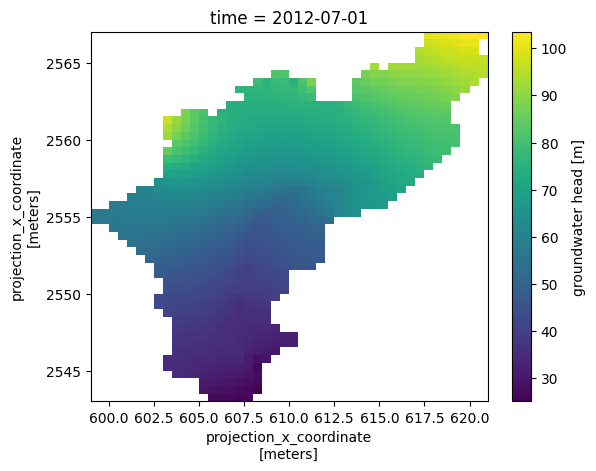
institution: BRGM, French Geological Survey, Orléans, France# on plot à un instant t
ds_3d.isel(time=-1)['charge'].plot.pcolormesh(x='x',y='y')
<matplotlib.collections.QuadMesh at 0x7968514aad10>
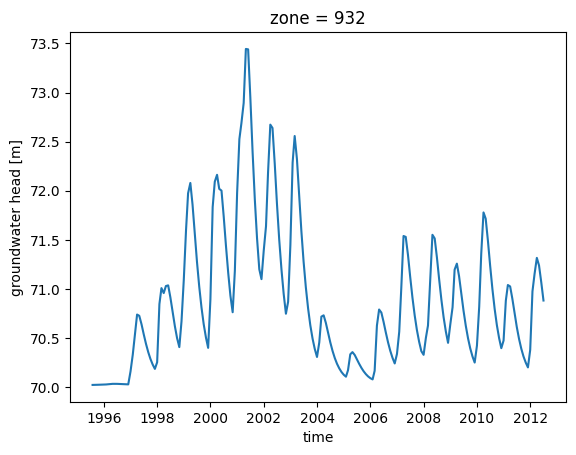
# ou la chronique dans une maille
ds.isel(zone=255)['charge'].plot()
[<matplotlib.lines.Line2D at 0x79685161bdc0>]
Pour les gigognes, une fonction de plot spécifique est proposée (gm.plot_nested_grids()).
Pour les modèles avec plusieurs couches, on peut récupérer les couches de surfaces~: gm.get_min_layer(ds, [subset_layers=[3,5]])
ou même afficher ce résultat~: gm.plot_outcrop()
Les fonctions natives de xarray, numpy permettent d’ores-et-déjà d’accéder à certaines fonctionnalités de Operasem (substitution de valeurs, transformation, opérations entre deux grilles, etc.)
Fonctionnalités avancées
Exemple de calcul du SPLI (package pyspli, https://gitlab.brgm.fr/brgm/si-eau/traitements-et-valorisations/py_spli)
import numpy as np
import spli
from multiprocessing import cpu_count
---------------------------------------------------------------------------
ModuleNotFoundError                       Traceback (most recent call last)
Cell In[8], line 2
      1 import numpy as np
----> 2 import spli
      3 from multiprocessing import cpu_count

ModuleNotFoundError: No module named 'spli'
ds_spli = spli.compute_spli(ds, n_jobs=cpu_count()) # monthly mean included, dummy ref_period: only for example
#ds_spli = spli.compute_spli(ds, ref_period=[1995, 2010], n_jobs=cpu_count()) # monthly mean included, dummy ref_period: only for example
ds_spli
<xarray.Dataset> Size: 2MB
Dimensions:  (zone: 927, time: 205)
Coordinates:
  * zone     (zone) int64 7kB 255 256 257 258 259 ... 2722 2723 2724 2725 2726
  * time     (time) datetime64[ns] 2kB 1995-07-01 1995-08-01 ... 2012-07-01
Data variables:
    spli     (time, zone) float64 2MB 0.06557 0.06549 0.06554 ... 0.01162 0.6706
Attributes:
    varname:        CHARGE
    units:          m
    missing_value:  9999.0
    standard_name:  water_table_level
long_name: groundwater head# get coords back
ds_spli['x'] = ("zone", ds['x'].data)
ds_spli['y'] = ("zone", ds['y'].data)
if "z" in ds_spli.data_vars.keys():
ds_spli['z'] = ("zone", ds['z'].data)
# assign coords for plot
ds_xy_spli = ds_spli.assign_coords(
x=('zone', np.around(ds_spli['x'].data, 1) ),
y=('zone', np.around(ds_spli['y'].data, 1) ),
)
ds_xy_spli = ds_xy_spli.set_index(zone=['y', 'x']).unstack('zone').sortby('y', 'x')
ds_xy_spli
<xarray.Dataset> Size: 3MB
Dimensions:  (y: 48, x: 44, time: 205)
Coordinates:
  * y        (y) float32 192B 2.543e+03 2.544e+03 ... 2.566e+03 2.567e+03
  * x        (x) float32 176B 599.2 599.8 600.2 600.8 ... 619.8 620.2 620.8
  * time     (time) datetime64[ns] 2kB 1995-07-01 1995-08-01 ... 2012-07-01
Data variables:
    spli     (time, y, x) float64 3MB nan nan nan nan ... 0.1627 0.519 0.6357
Attributes:
    varname:        CHARGE
    units:          m
    missing_value:  9999.0
    standard_name:  water_table_level
long_name: groundwater head# plot res
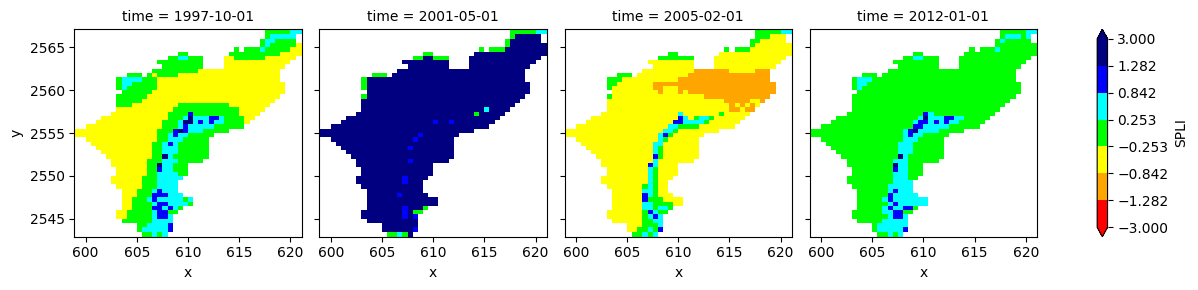
da=ds_xy_spli['spli'].sel(time=['1997-10-01', '2001-05-01', '2005-02-01','2012-01-01'])
da.plot.pcolormesh(
x="x", y="y",
extend='both',
levels=[-3, -1.2815, -0.8416, -0.253, 0.253, 0.8416, 1.2815, 3],
colors=['red', 'red', 'orange', 'yellow', 'lime', 'cyan', 'blue', 'navy', 'navy'], # double extrema for extended colors
col='time',
cbar_kwargs={
'label': 'SPLI',
# 'ticks_label': ['Très bas', 'Bas', 'Modérément\nbas', 'Autour de la\nmoyenne', 'Modérément\nhaut', 'Haut', 'Très haut']
}
)
<xarray.plot.facetgrid.FacetGrid at 0x7f7b284d8070>